
AI OCR software that turns difficult documents into trusted, structured data.
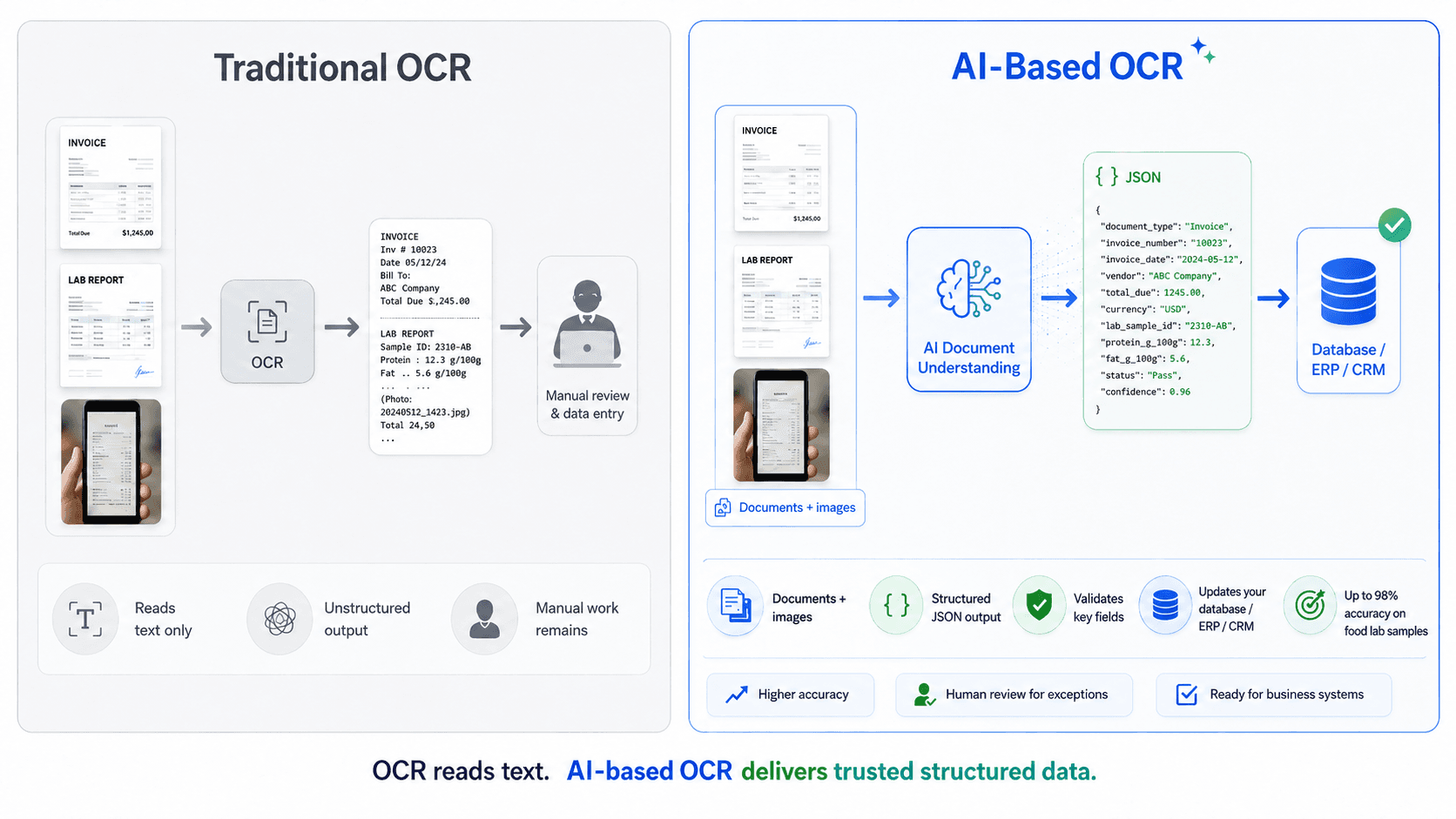
Our AI OCR software combines OCR, document understanding, validation logic and private LLMs to extract text, tables and fields from complex documents and images — then turns them into structured data your systems can use.
Low-confidence values are validated, corrected or re-checked before they are accepted, with source-level traceability and private deployment for sensitive documents. It's AI-based OCR software built for regulated, high-stakes documents, not a generic OCR wrapper.
Scope: complex structured PDFs and real-time images shot on a phone — a food sample label, a nameplate, a handwritten form.
AI OCR software built around your document types and fields, not a generic template.
Up to 98% accuracy, with exceptions routed to a person instead of silently guessed.
Database updates pushed straight into your structured database via webhooks.
Image-to-text conversion as the first step — OCR is where we start, not where we stop.
OCR reads the text. AI OCR software does the job.
OCR technology turns an image into raw text — it does not know an invoice number from a phone number. AI OCR software is what we build on top of it: it understands the document's structure, extracts the fields that matter, validates them against your other systems, and hands off a structured record instead of a wall of text someone still has to read.
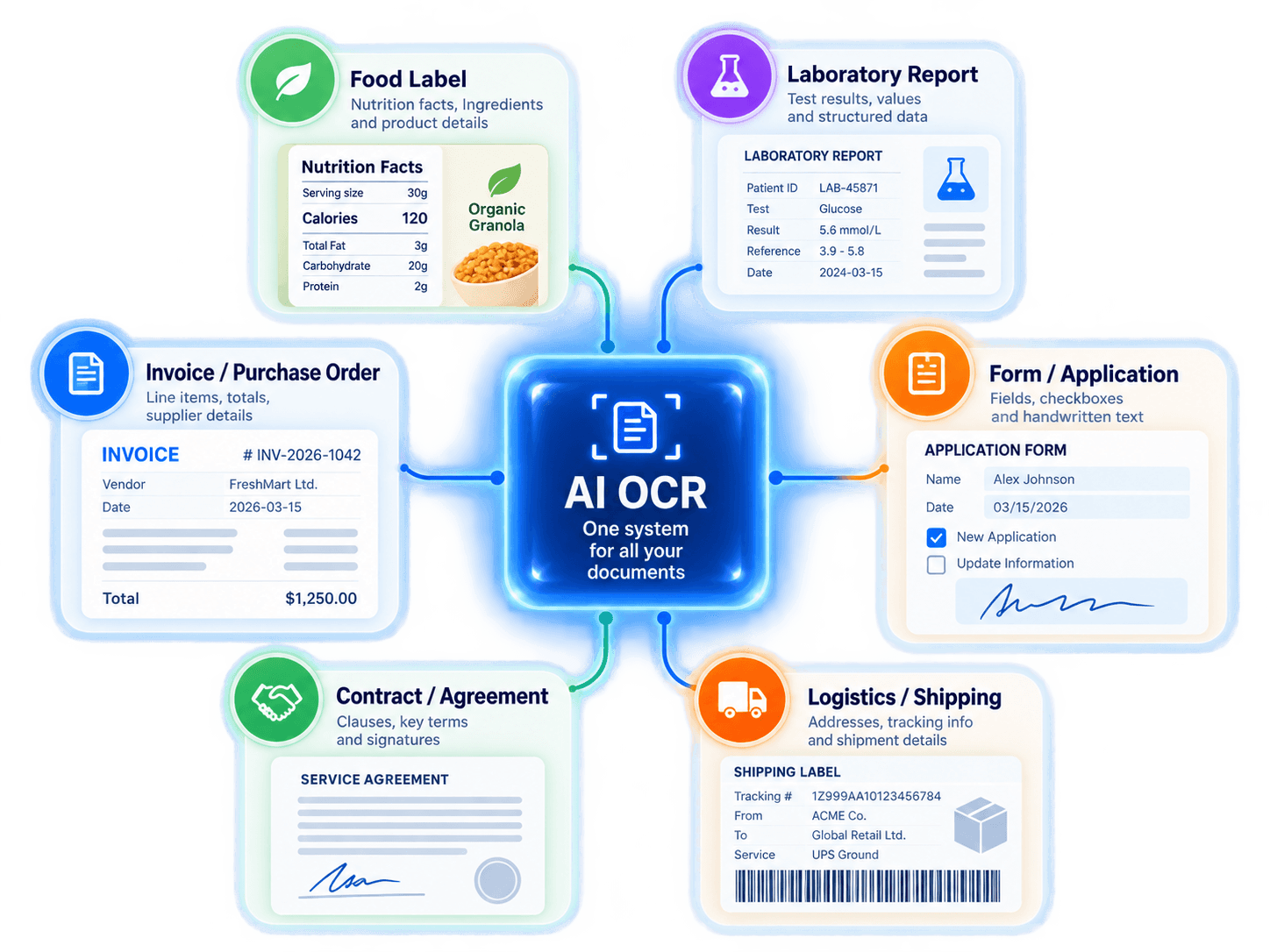
Paperwork that is really a data-entry queue
Every one of these is a data-entry queue in disguise — AI OCR software turns it into an OCR automation pipeline instead of a typing task.
Nutrition tables, ingredient lists, allergen statements, claims, barcodes and product information extracted from labels and packaging — including complex layouts, rotated regions and phone-captured images.
Instrument output, certificates and result sheets converted into validated records, with the source image retained against every reported value.
Line items, totals, taxes and supplier details extracted and cross-checked against orders and received goods, with exceptions routed for review. Think of it as AI accounting software with OCR built in, not a separate step your finance team has to manage.
Submitted paperwork turned into structured records, including handwritten fields, checkboxes and mixed printed content.
Inspection reports, certificates, specifications and audit documents converted into structured, traceable data for downstream workflows.
Key terms, dates, parties and obligations extracted into structured records, with every value traceable to the source clause.
Delivery notes, shipping documents, customs paperwork and certificates reconciled against what was ordered and what arrived — AI OCR software for ports and freight teams that would otherwise retype every manifest by hand.
Every document type above started as a one-off. If yours has its own layout, language or field set, we build a custom extraction agent around it rather than force-fitting a generic template.
Every one of these starts as an OCR data extraction problem. What makes it intelligent OCR software — OCR software with AI baked in, not bolted on — rather than a plain scanner is validation, confidence scoring, and a human check on anything the model is unsure about.
Extraction is easy. Trusting it is the work.
Every field our AI OCR software reads carries a confidence score and a link back to the place on the page it came from. Low-confidence values go to review rather than into your system unnoticed. Validation rules catch what the model cannot know — totals that do not add up, dates out of range, values a lab would never report.
You decide the threshold. We show you what it costs at each level — that transparency is what makes this the best AI OCR software choice for regulated, high-stakes documents.
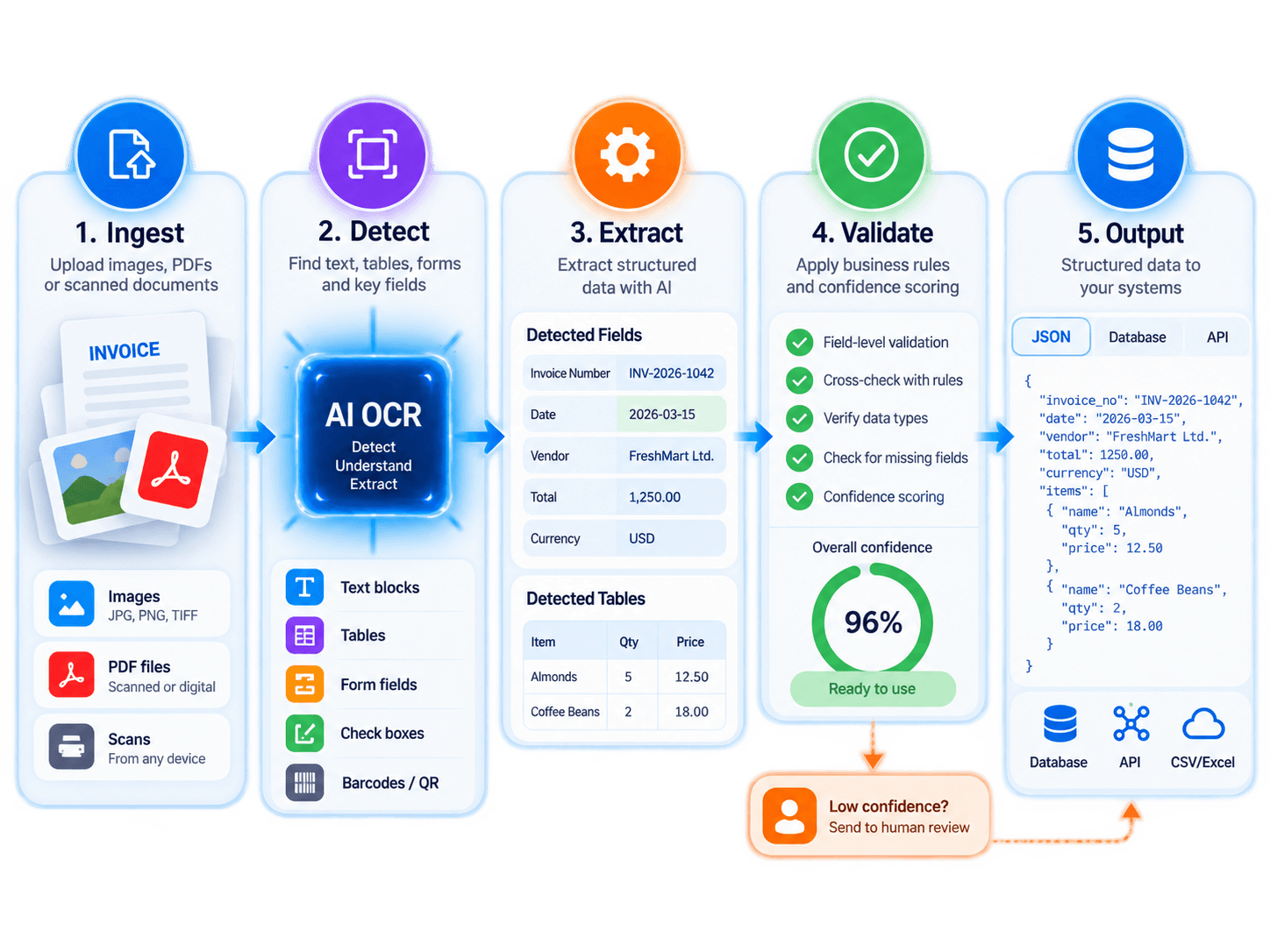
- 01Ingest
Email, scanner, folder, portal or our OCR API — documents arrive the way they already arrive.
- 02Read & extract
Layout understood per document type, fields and tables pulled with position retained.
- 03Validate
Business rules, cross-checks against your own records, confidence scoring per field.
- 04Review what needs it
A review screen showing the value next to the original image, so a check takes seconds.
- 05Into your system, with a trail
Structured records written where they belong, every figure traceable to its source page. How we deploy privately →
One engagement, in detail
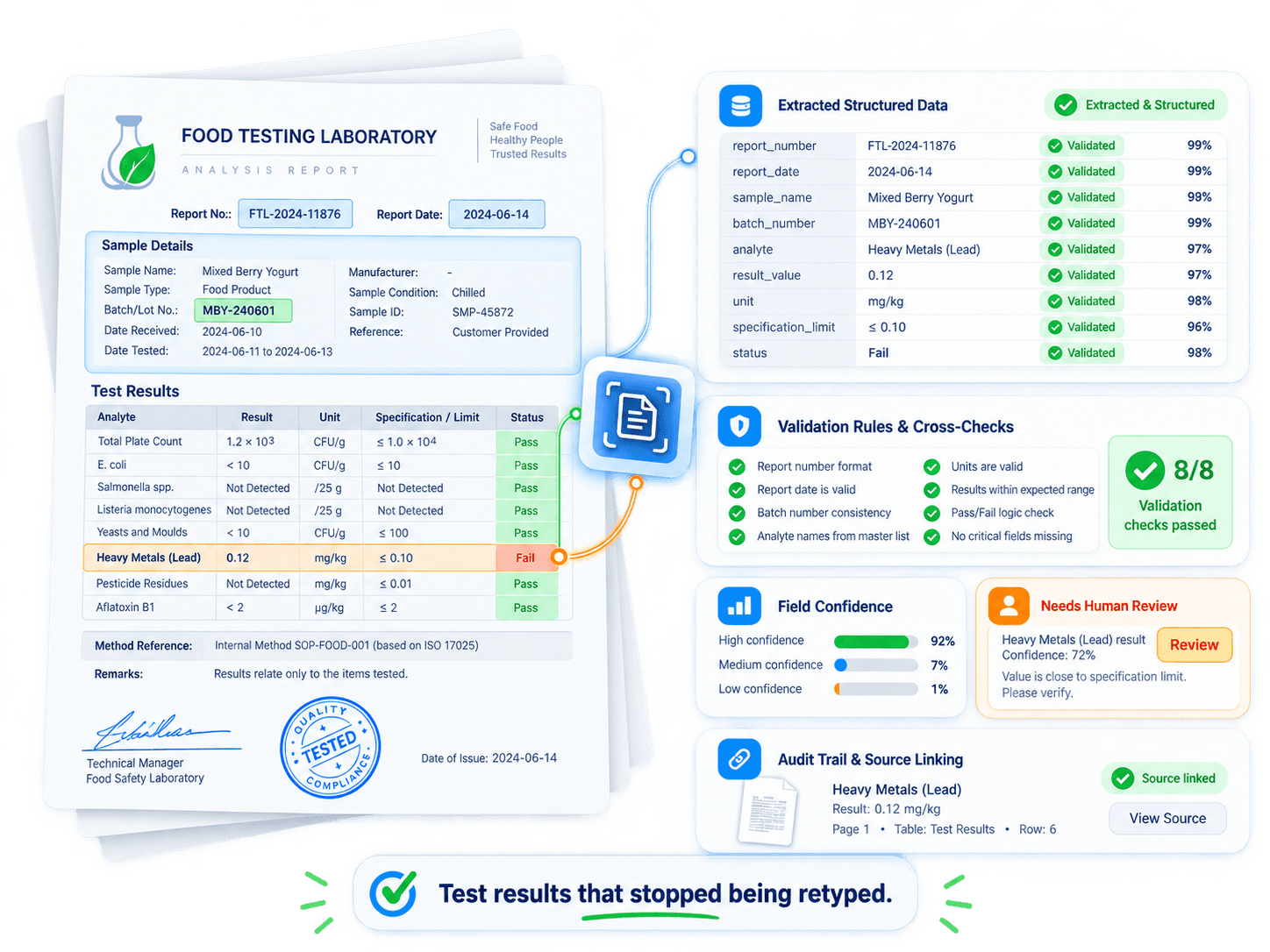
Test results that stopped being retyped
- Context
- A food testing laboratory in Europe. Results are client-confidential and the lab works to accreditation requirements, so every reported figure has to be traceable.
- The problem
- Results arrived as images and were keyed into the lab system by hand. It was slow, it introduced transcription errors into reported data, and it put a person between the instrument and the record.
- What we built
- Automated reading of the result images into structured, validated records with our AI OCR software — field-level confidence, range checks against expected values, and the source image retained against each figure. Anything the pipeline is unsure about goes to a reviewer with the image alongside.
- Deployment
- Privately hosted models, no test data or client identifier leaving the approved environment, with an audit trail per document for accreditation.
- Capabilities
- Image to structured dataValidation rulesConfidence scoringHuman reviewPer-document audit trail
Common questions
OCR (optical character recognition) is the OCR technology that reads printed or handwritten characters in an image and turns them into machine-readable text. It's the first step behind most OCR tools, including the AI OCR software we build — but text on its own has no structure: it doesn't know a total from a phone number.
The full form of OCR is Optical Character Recognition — software that recognizes characters in a scanned document or photo and converts them into digital, searchable text.
OCR in AI systems is the entry point, not the destination. Plain OCR AI software extracts raw text; document AI — the layer our AI OCR software adds on top — understands the document's structure, validates fields against your records, and hands off a structured, confidence-scored record instead of a wall of text.
Up to 98% accuracy, with exceptions routed to a person instead of silently guessed. Every field carries a confidence score and a link back to where it came from on the page, and you decide the threshold at which a value goes to review.
Yes. Alongside complex structured PDFs, it reads real-time images shot on a phone, such as a food sample label, a nameplate or a handwritten form, including handwritten fields, checkboxes, rotated regions and mixed printed content.
Documents arrive the way they already arrive: by email, scanner, folder, portal or our OCR API. After extraction and validation, structured records are written where they belong, with database updates pushed straight into your structured database via webhooks and every figure traceable to its source page.
Send us the document your team keys in by hand.
A discovery session is a working conversation, not a demo. Bring a handful of real examples, including the bad scans.